


Product reviews
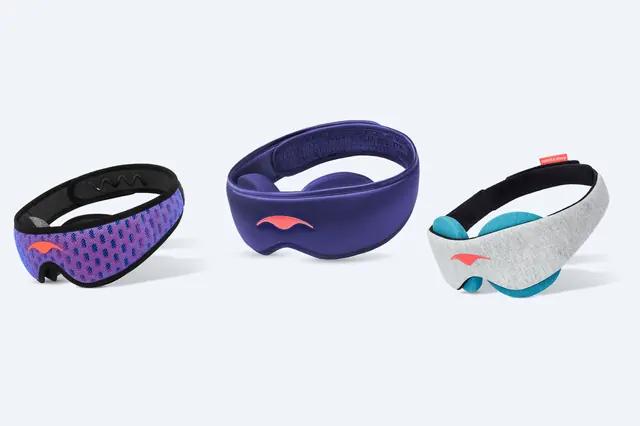
Manta Sleep Mask review: we tried the PRO, SILK and COOL
An honest, hands-on Manta Sleep Mask review. We slept in the PRO, SILK and COOL: how each fits, blocks light and feels for side sleepers, and which to buy.
8 min read
Free in your browser
More
Plus gamesPlusTurning E, Faint E, Track and spotFor gamersReaction, aim and tracking rounds with a Start Lights game on the pageFor sportsShort reaction and tracking rounds for a warm-up.For screen workScreen breaks, a focus timer and an eye journal.Screen breaksA break timer, a far view and calm one-minute gamesPrograms7, 30 and 90-day programs. The 7-day ones are free.All gamesEvery free game in one placeSee the gamesFree in your browser
Latest articles
An honest, hands-on Manta Sleep Mask review. We slept in the PRO, SILK and COOL: how each fits, blocks light and feels for side sleepers, and which to buy.
Rub and rinse the case with fresh solution, never water, dry it and leave it upside down with the caps off. Replace it at least every three months.
Mostly, you get better at the games. A large 2016 review found little evidence the gains carry over to work, school or everyday memory.
Not a symptom, but useful context. Logging hours at a screen next to how your eyes feel helps you and your eye doctor see patterns.
A few notes each time it happens make an appointment more useful, especially when it comes and goes. A notebook works, or a free eye symptom journal that keeps them by date.
Eye doctors often ask what it feels or looks like. Picking the words that fit, and writing them down the same way each time, makes notes from different days easier to compare.
Bring your notes, and any eye photos taken the same way each time, so you can answer questions about when and how often. The checklist of questions for your eye appointment puts it all on one page.
What the 20-20-20 rule is, how digital eye strain happens, what a 2022 study found about screen breaks, and simple screen setup tips from eye care experts.
Swapping a laptop for a phone isn't much of a break. Simple things to do in 20 seconds, 5 minutes or 15 minutes away from the screen.
What eye care and pediatric bodies say about screens and children's eyes, and practical habits for breaks, distance, light and sleep.
Need a break right now? Play a two-minute eye game, free in your browser, or let the 20-20-20 screen break timer remind you. To check your desk, try the monitor distance calculator.
End of guide